Scribby Max Draw on Footage, Animate Doodles & Build Mixed-Media Edits in Premiere Pro


Secure checkout via Paddle
Inside Scribby Max
Draw on Footage & 1-Click Timeline Placement
Animate Mode: Draw Frame by Frame on Your Footage
Wireless iPad + Apple Pencil Link (optional)
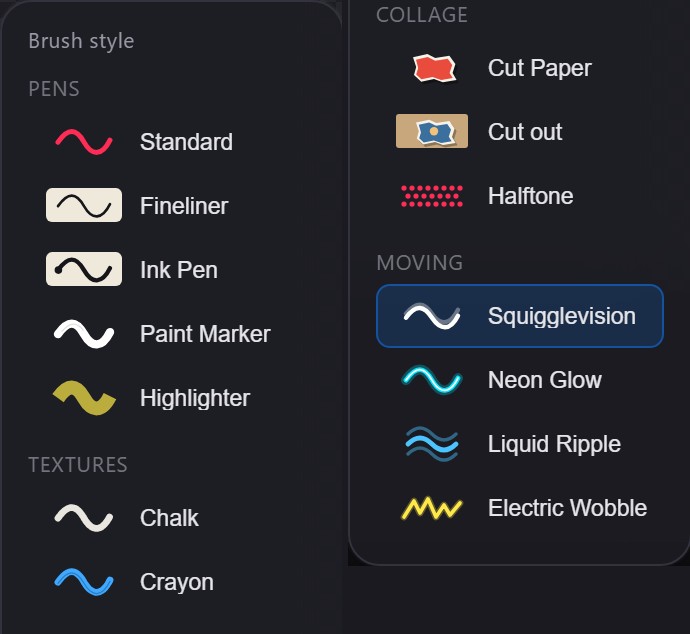
11 Expressive Pens & Smart Tap-to-Fill
Save your own shapes for future uses
Create & Save Your Own Custom Shapes Forever
50+ Paper, Card & Fabric Backgrounds + Cut-Out Mode
Image-to-Drawing & Live Freeze-Frame Painter
FAQ
What's the difference between Plus and Max?+
Max includes everything in Plus and adds many more features: Animate (frame-by-frame drawing over your video with onion skinning), the wireless iPad + Apple Pencil link, custom shapes you save forever, 50+ paper, card & fabric backgrounds with Cut-Out mode, the 10-style Image-to-Drawing and freeze-frame painter, and the advanced pens and smart fill.
Do I need an iPad for Scribby Max?+
No. Animate and everything else work on the computer alone. The iPad link is optional: any iPad that can open a web page on the same Wi-Fi works, and an Apple Pencil is what makes it good to draw with.
How does the iPad connect? What Wi-Fi does it need?+
The iPad and your computer need to be on the same Wi-Fi (or both on the same phone hotspot), not mobile data. In Animate, click the iPad button, scan the code with the iPad's camera and open the link in Safari. Nothing to install on the iPad, and nothing goes over the internet: the iPad talks to Premiere across your own network. Guest Wi-Fi and work or school networks often block it, and so does a VPN on the computer, so use your home Wi-Fi or your phone's hotspot there. If it won't connect, the iPad button shows the likely fix, usually a firewall asking you to allow Premiere Pro on private networks.
Where does Scribby store my animations, and how much space does it use?+
Each animated scribble is saved as one image per frame in a visible folder on your computer, Documents / Scribby Max. They are small, usually a few MB per animation, but they add up if you animate a lot. Those images are your artwork, so please don't delete the folder by hand. Instead, open the Storage window from the panel's menu: it shows how much space every animation takes and lets you clear the ones you no longer need.
Does Max replace Scribby Plus?+
No. Max has everything Plus has, plus many more features. It is a separate product with its own license key.
How long can a scribble be on the timeline?+
5 seconds, for any single clip, static or animated. The one exception is Write-On, which gets its own 10-second ceiling since its length comes from however long the recording takes to replay, not a free choice. If you need a longer continuous effect, you can easily chain clips back-to-back or hold static frames right on your Premiere timeline.
How do I install it after downloading/buying?+
You'll get an email with a download link within a few minutes. The zip includes the panel file plus a full install guide — short version: install the free ZXPInstaller tool, drag the panel file onto it, restart Premiere, then open Scribby from Window → Extensions.
Does it work with a cracked copy of Premiere Pro?+
No. Scribby needs a genuine, licensed install of Premiere Pro — it won't run properly on a cracked or modified copy, and we can't offer support for those installs.
Is Scribby a subscription?+
No. We hate subscriptions too. Pay once, use it forever.
What if I run into a problem?+
Use "Report a Bug" from Scribby's right-click menu or dock flyout — it writes a diagnostic file to your Documents folder. Attach it to an email to support along with a screenshot and we'll help sort it out.
What's the refund policy?+
14 days. Email support within 14 days of buying and we'll review your refund request. If something's actually broken — install fails, a feature doesn't work as described — tell us first and we'll try to fix it; if we can't, you get your money back.
How do I draw and create hand-drawn doodle animations in Premiere Pro without After Effects?+
With Scribby Max, you can draw kinetic doodles, rotoscope frame-by-frame with Onion Skinning, and stack paper textures directly inside your Adobe Premiere Pro timeline—no After Effects or Dynamic Link needed.
What makes Scribby better than doodle asset packs or MOGRT templates?+
Pre-made video packs force you to reuse static animations, and complex MOGRTs can slow down your Premiere Pro playback. With Scribby you draw your own customizable hand-drawn animations, with adjustable stroke thickness, colors, speed, and an authentic "boil" (frame jitter) effect.
What is the best Premiere Pro plugin for scribble and sketch effects?+
Scribby is a dedicated Premiere Pro extension designed specifically for creating customizable, dynamic hand-drawn scribble effects and animated overlays.
What editing styles is Scribby built for?+
Scribby is built for high-retention visual hooks in Instagram Reels, TikToks, and YouTube Shorts, as well as documentary and explainer-style YouTube videos.
Does it work with iPhone HEVC or ProRes footage?+
Yes. Tricky iPhone HEVC or ProRes footage is automatically handled via a one-time background copy in Adobe Media Encoder, with an automatic built-in fallback if Media Encoder isn't installed. Scribby works on Mac & Windows (Premiere Pro 2025 & 2026).
Is Scribby compatible with Mac and Windows?+
Yes! Scribby works seamlessly inside Adobe Premiere Pro on both Windows and macOS.
Only need the basics? Scribby Plus is $39.99 →
New to this? How to draw on footage in Premiere Pro
Make your edits move.
One-time payment · No subscription